
If you have landed on a link beginning with uitly.in, or you are shopping around for a link management platform and want to know what this one actually offers, you are in the right place. Uitly.in is a small, quietly built site with a fairly ambitious pitch: shorten your links, generate QR codes from them, and wrap the whole lot in a bio page you can drop into any social profile.
This guide is a straight, unembellished look at what the site publishes and, just as importantly, what it does not. Every factual claim here comes from the live site itself, and where Uitly stays silent, pricing being the obvious example, we say so plainly instead of guessing. Along the way you will get general, tool-agnostic guidance on short links, dynamic QR codes and smart deep linking, so you can judge whether Uitly.in fits the job you have in mind.
Key takeaways
- What it is: Uitly.in is a link management platform offering short URLs, dynamic QR codes and bio pages, with smart deep linking as its headline feature.
- Standout feature: smart deep linking opens the exact screen inside an app rather than dumping people on a homepage or app store listing.
- No published pricing: the site does not list any prices, plans or free tier. You have to ask.
- Not self-serve: every GET STARTED button opens the contact page, so onboarding is enquiry-led rather than instant signup.
- Dual identity: uitly.in is both a product landing site and an active multi-niche Tech and Blog publication.
- Before you commit: ask about link ownership, custom domains, data export and what happens to live links if you stop paying.
What Is Uitly.in?
Uitly.in is a link management platform that presents three core tools on a single site: short URLs, dynamic QR codes and bio pages. A fourth capability, smart deep linking, is described as a standout feature rather than a separate product. The site runs on WordPress with Elementor, which tells you a fair amount about how it is built and maintained.
The homepage does not hedge. Its headline reads “Create Short URLs, QR Code & Beautiful Bio Page”, followed by the sub-headline: “Welcome to Uitly, Our Website offers powerful tools to shorten URLs, create dynamic QR codes, and beautiful bio pages.” Further down the page, the pitch turns commercial: “One short link, infinite possibilities to Grow Your Business.”
The four capabilities, in the site’s own framing, break down like this. Short links turn long, messy URLs into clean, branded ones you can share in emails, social posts or print campaigns. QR codes are generated from those links in a single click, for business cards, flyers, posters and product packaging. Bio pages act as a hub for all your important links, aimed at creators, influencers and small businesses. And smart deep linking sends people straight to the right screen inside an app rather than a generic homepage; the site’s own example is a Spotify promotion that opens the actual song in the Spotify app.
Two findings are worth flagging early, because they colour everything that follows. First, there is no pricing page anywhere on the site. Second, there is no public signup, login or dashboard exposed on uitly.in: every “GET STARTED” button routes to the contact page. In practice that makes Uitly enquiry-led rather than self-serve, which is a real difference from tools you can be using thirty seconds after typing in an email address.
Uitly.in at a glance
Here is everything the site verifiably publishes about itself, gathered in one place.
| Detail | What the site shows |
|---|---|
| Website | https://uitly.in/ |
| Brand | Uitly (logo styled as “Uitly.in”) |
| What it does | Link management: shortening URLs, creating QR codes and building bio pages |
| Core tools | Short links, QR codes, beautiful bio pages, smart deep linking |
| Platform / tech | WordPress with Elementor, SureForms for forms, Yoast SEO |
| Site sections | Home, Tech, Blog, Contact, About Us (with Disclaimer and Terms and Conditions), plus Article, Uitly Bio Profiles and Privacy Policy |
| Contact email | admin@raihanitfirm.com |
| Contact phone | +8801882536532 (+880 is the Bangladesh country code) |
| Pricing published? | Not published on the site |
| Self-serve signup? | No. “GET STARTED” links to the contact page |
| Content categories | Tech and Blog |
The dual identity of uitly.in
Here is the part most write-ups miss. The domain is not only a product landing site. It is also an actively published multi-niche magazine, sorted into two categories, Tech and Blog, and the subject matter travels a very long way from link management.
Real published titles include:
- “What to Look for Before Signing Up for an IPTV Free Trial”
- “How NRIs in the USA Stay Connected to Their Roots with IPTV USA?”
- “The Legacy of Donkey Kong Jr. and the Birth of a Hero”
- “RECD Manufacturer: How to Choose the Right Partner for Cleaner Diesel Generator Emissions”
- “Top 10 Solar Inverter in India: Best Models for Home & Business”
- “Real-Time UI: The Design Challenges That Distinguish Live Data Interfaces From Static Digital Products”
That is an observation rather than a criticism. Plenty of small software sites publish broadly to build traffic, and a WordPress install makes it easy to do. It does mean the domain reads as two things at once, so if you arrive expecting a tightly focused SaaS marketing site you will find something wider than that.
For the product framing, the About Us page is the clearest statement of intent, describing Uitly as “not just another URL shortener” but “a comprehensive platform that helps users unlock the full potential of their links”. The dedicated Uitly Bio Profiles page goes deeper on the link in bio page side of the offer. No leadership team, company registration or office address is named anywhere on the site.
Uitly.in Short Links: Turning Long URLs Into Clean, Clickable Assets
Short links are the first thing Uitly.in leads with, and the homepage explains the pitch in plain language. Here is the feature description in the site’s own words.
“Long, messy URLs can look unprofessional and discourage clicks. Uitly solves this by letting you create clean, branded short links that are easy to share anywhere — from emails and social media posts to print campaigns.”
That single paragraph is the extent of what the site publishes about the feature, and as noted above there is no dashboard or trial to look at either. So read the rest of this section as general guidance on how a URL shortener works, not as a description of Uitly’s product screens.
Why long URLs quietly cost you clicks
A live campaign URL is routinely 150 characters of folder path, product ID and tracking parameters. Nobody reads it, and several channels punish it outright.
- Truncation. SMS, WhatsApp previews and some email clients cut long links mid-string, which can break them entirely.
- Trust. A URL stuffed with utm_source, fbclid and random hashes reads as spam, and people hesitate before tapping it.
- Print and voice. Nobody types a 40-character path off a poster, a business card or a podcast read.
- Character limits. On bios, ad copy and SMS, every character you claw back is a character of persuasion.
The click-through cost is real but rarely measured, because the clicks you lose never show up in a report. You only see the ones that survived.
How does a URL shortener work?
The mechanism is simpler than most people assume. You submit a destination URL, the platform stores it against a short code (the slug, the bit after the slash), and it hands you back domain.com/slug. When someone clicks, the redirect server looks up that slug, finds the destination and issues an HTTP redirect. The whole round trip usually takes a few dozen milliseconds.
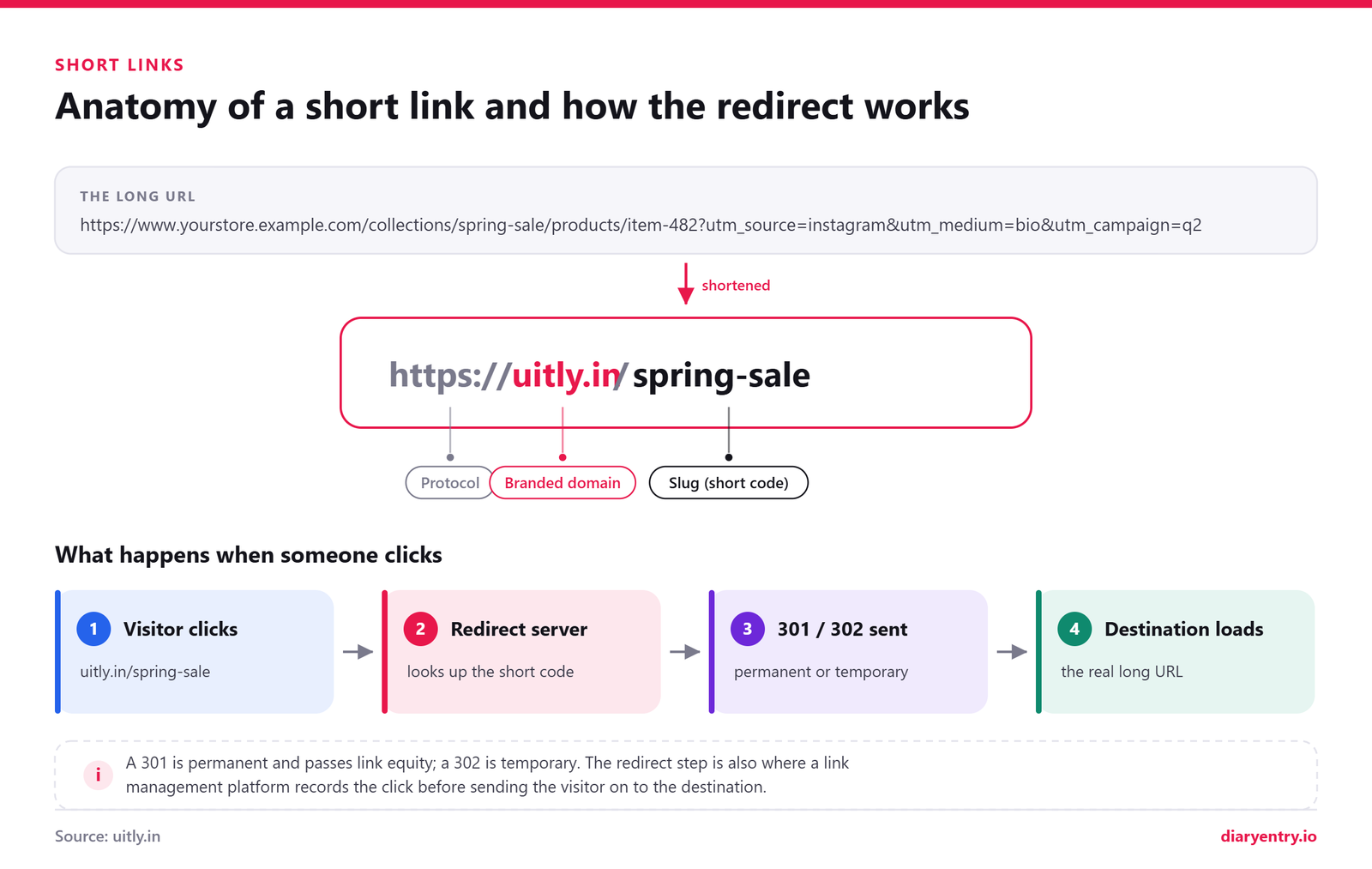
The redirect status code is where it gets interesting. A 301 is permanent, so browsers cache it aggressively and repeat visitors may skip the redirect server entirely, which means your click counts under-report. A 302 is temporary: nothing is cached, every click passes through the server, and your analytics stay accurate. That is why most link management platforms default to 302.
For SEO the trade-off flips. A 301 passes the bulk of link equity to the destination, which is what you want when permanently moving a page. For marketing links you need measured, and occasionally re-pointed, 302 is the safer default.
Branded short links and why they matter
Generic shortener domains work, but they hide who is behind the link. A branded domain, meaning a short domain you own and connect to the platform, keeps your name visible at the exact moment someone decides whether to tap.
| Factor | Generic short domain | Branded short domain |
|---|---|---|
| Recognition | Anonymous, could be anyone | Your brand sits inside the link |
| Trust signals | Often filtered as suspicious | Reads as first-party |
| Recall | Random character strings | Memorable, speakable in print or audio |
| Portability | Tied to the provider | You own the domain and can move it |
Uitly’s own copy uses the word “branded” when describing short links, though the site does not publish how custom domains are configured. That is a fair question for the enquiry form.
Short link best practices worth following
These apply to any shortener you end up using, Uitly included.
- Write readable slugs. /spring-sale beats /x7Kq2p for anything a human will actually see.
- Agree a naming convention early, such as channel-campaign-date, and hold the whole team to it.
- Keep UTM parameters on the destination URL so your analytics platform still attributes the traffic properly.
- Never shorten an already-shortened link. Chained redirects add latency and quietly break click tracking.
- Always point at HTTPS destinations, since an insecure hop triggers browser warnings.
- Test every link on a real phone before it goes to print. A typo on 5,000 flyers is unfixable.
- Prefer editable destinations where the platform supports them, so a dead landing page does not kill the campaign.
- Keep a link inventory in a shared sheet: slug, destination, owner, campaign, expiry date.
- Audit quarterly for link rot and retire anything pointing at a 404.
- Never shorten links carrying tokens, passwords or personal data in the query string.
Dynamic QR Codes: Bridging Offline and Online
QR codes are the part of your marketing that lives on paper, glass, cardboard and vinyl. Uitly.in treats them as the offline half of its link management platform, and its own feature copy is plain about the job they do.
“Want to connect with people offline? Uitly generates scannable QR codes from your links with a single click. These QR codes can be placed on business cards, flyers, posters, or product packaging, giving anyone instant access to your digital destination.”
The homepage hero goes slightly further, offering tools to “shorten URLs, create dynamic QR codes, and beautiful bio pages”, and the Uitly Bio Profiles page describes a dynamic QR code working alongside link tracking so one campaign can cover flyers and business cards as well as social feeds.
What the site does not publish is the detail underneath. There are no documented customisation options, no file formats, no bulk generation limits, no scan-analytics screenshots. And since every “GET STARTED” button routes to the contact page rather than a signup screen, you would need to ask before you know exactly what you are getting. That is worth establishing before you commit to a print run.
Static vs dynamic QR codes: the difference that matters
This is the single concept to understand before you generate anything, and it applies to every QR tool on the market, not only Uitly.
A static QR code bakes the destination URL straight into the black-and-white pattern. The pattern is the address. Print it and it is fixed forever, and nobody can tell you how many people scanned it.
A dynamic QR code encodes a short link instead. The pattern points at a redirect you control, so you can re-target the destination later and count every scan along the way. Dynamic QR codes and a URL shortener are really the same technology wearing different clothes, which is why platforms bundle short links, QR codes, a link in bio page and smart deep linking together.
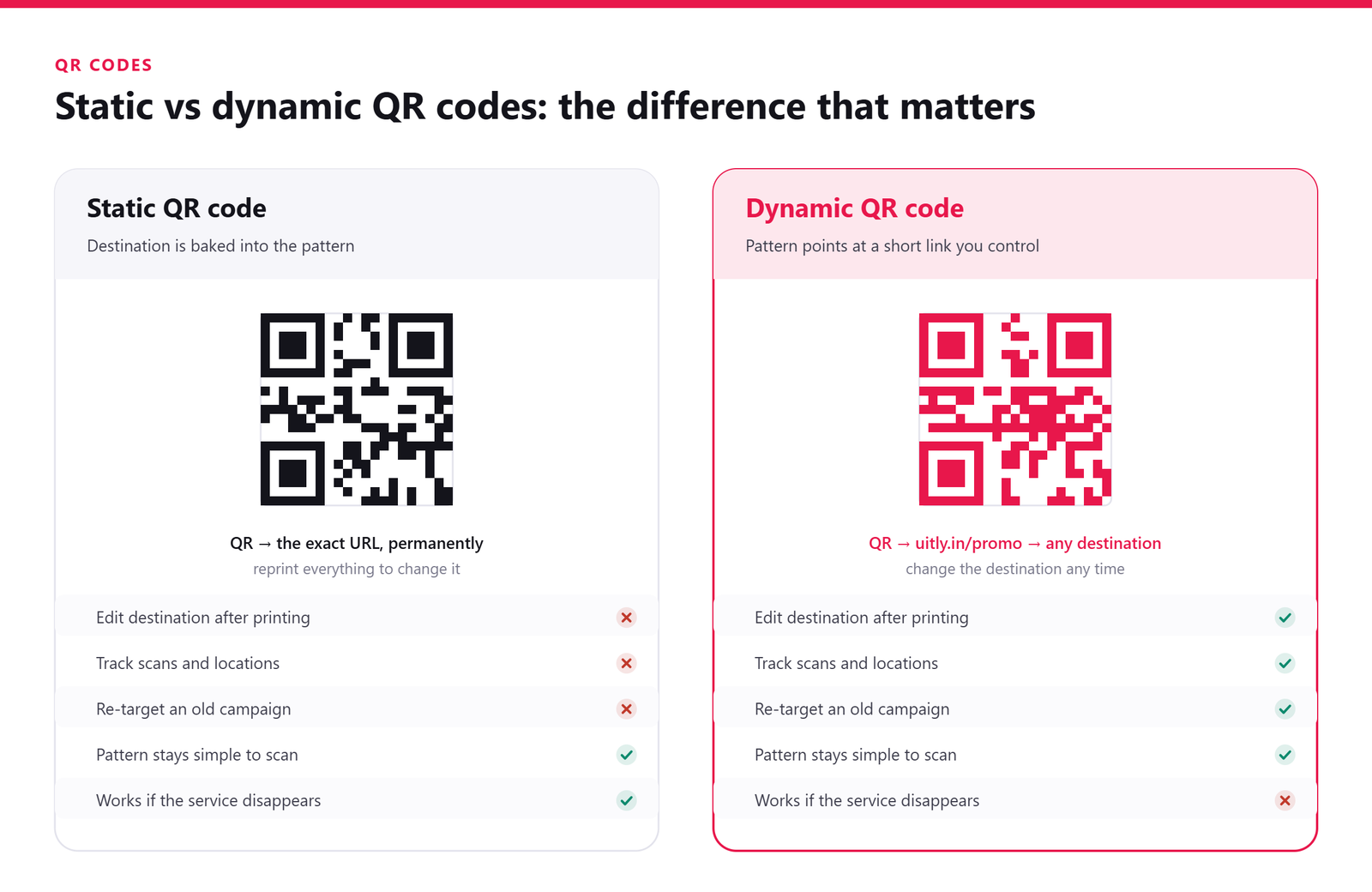
| Factor | Static QR code | Dynamic QR code |
|---|---|---|
| Editable after printing | No. The destination is permanent. | Yes. Change where the short link points at any time. |
| Scan analytics | None whatsoever. | Typically scan counts, timing, device type and approximate location. |
| Pattern density | Grows denser and harder to scan as the URL gets longer. | Stays light and open, because a short link is only a few characters. |
| Best for | Wi-Fi credentials, vCards, permanent one-off signage. | Packaging, campaigns, anything printed in volume or reused. |
| Dependency on a service | None. It works even if the generator disappears. | Real. If the redirect service goes offline, every printed code breaks. |
That last row is the honest trade-off, and it should shape how you judge any QR provider, Uitly included. Dynamic codes are better in almost every practical way, but you are tying printed assets to a service staying live. Ask about domain ownership and long-term redirect guarantees before you print ten thousand labels.
Where do QR codes earn their place?
QR codes work best when someone is physically near your brand and holding a phone. Reliable settings include:
- Product packaging linking to setup guides, ingredient detail or reorder pages.
- Restaurant table tents for menus, ordering and review prompts.
- Business cards pointing at a link in bio page rather than a single website.
- Event badges and lanyards for schedules, speaker notes and networking profiles.
- Posters and transit ads, where a memorised URL is unrealistic.
- Invoices and statements that jump straight to a payment page.
- Property signage outside a listing, opening the full gallery at the kerb.
- Museum and gallery labels offering audio, translations or deeper context.
- Wi-Fi sharing in cafes, clinics and offices, which is one of the rare genuinely good uses for a static code.
How to design a QR code people will actually scan
- Size it properly. Around 2 x 2 cm (0.8 in) is the practical minimum at arm’s length. Scale up roughly one tenth of the intended scan distance.
- Respect the quiet zone. Leave clear space of at least four modules on all sides. Crowding the border is the most common reason a code fails.
- Keep contrast high. Dark pattern on a light background. Inverted or low-contrast codes scan badly, and some readers refuse them outright.
- Pick the right error correction. Levels run L (~7%), M (~15%), Q (~25%) and H (~30%) of recoverable data. Use H whenever you drop a logo into the centre.
- Avoid busy backgrounds. Photographs and gradients behind a code confuse the camera. Give it a flat panel.
- Label it. “Scan for the menu” converts far better than a naked square. Tell people what they get.
- Test on real devices. iPhone and Android, in the actual lighting, from the actual distance, before mass printing.
- Mind the physical placement. Never across a fold, seam or tight curve, and never below knee height or above reach.
Uitly Bio Profiles: Your Link-in-Bio Hub
Of all the product content on Uitly.in, the bio profiles page is the most fleshed out. It opens with a definition that is refreshingly free of marketing noise: “Bio profiles, also known as link-in-bio pages, are custom pages that group multiple links and content under one URL.” That single sentence is the whole concept.
The Uitly Bio Profiles page sets out four benefits. You get one permanent bio link you can reuse across every social platform, support for rich media such as video and music, a design you can customise to your brand, and built-in analytics that track visits and click performance.
The workflow it describes is short and familiar to anyone who has built a link in bio page before:
- Create your profile page.
- Add content blocks and links.
- Customise the appearance so it matches your brand.
- Publish, then drop that one link into your social bios.
The stated differentiator is joined-up tooling. Because the bio page sits beside link tracking and dynamic QR codes on the same platform, the site positions it as working offline too, on flyers and business cards, not only in an Instagram profile. One honest caveat carries over from earlier in this guide: uitly.in publishes no signup form, no dashboard and no pricing, so building a profile begins with an enquiry through the contact page rather than a self-serve account.
Why the “one link in bio” problem exists in the first place
Instagram, TikTok and most other networks give you exactly one clickable slot in your profile. Everything you post around it is effectively unlinkable, which is a strange constraint for businesses that have five or six things worth clicking.
Then there is campaign churn. A new product drop, a podcast episode, an event, a seasonal offer: each one tempts you to swap the bio URL again. Every swap breaks the link you printed last month and resets whatever attribution you had. A bio page fixes the address once, so you edit the contents rather than the URL, and any QR code already in circulation keeps working.
Anatomy of a link in bio page that converts
This part is general best practice rather than anything Uitly publishes, but it applies to any link management platform you choose. A bio page is a landing page with an unusually impatient audience, and it rewards ruthless structure.
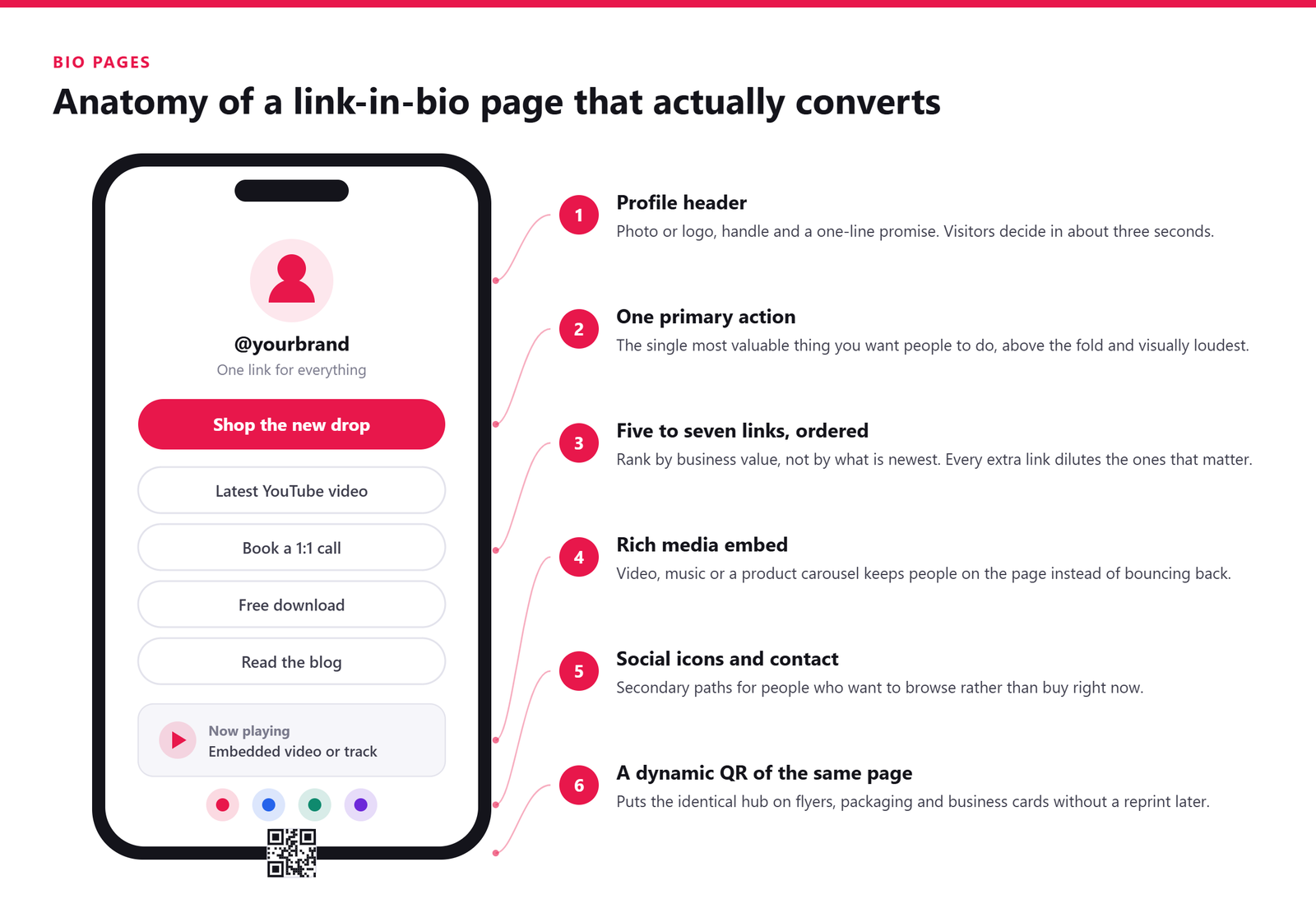
| Zone | What belongs there | Why it earns the space |
|---|---|---|
| Profile header | Photo or logo, name, one line explaining what you do | Visitors arrive cold from a bio tap and need instant confirmation they are in the right place |
| Primary CTA | The single action you most want: buy, book, subscribe | Above the fold on a phone is roughly the first screen height; anything below it collects a fraction of the taps |
| Supporting links | Five to seven, ordered by business priority | Ordering by revenue rather than recency stops your best offer sinking to the bottom |
| Rich media embeds | Latest video, track, reel or reviews | Media holds attention on the page instead of bouncing people back to the feed |
| Contact and booking | Enquiry form, calendar slot, email or messaging link | Turns passive browsers into actual conversations |
| Footer trust | Social icons, location, delivery or refund basics | Quiet signals that a real business sits behind the page |
The principle underneath all of that is one primary action. Decide the single outcome that matters this month and give it the top slot, the strongest contrast and the clearest verb. Everything else is a supporting cast.
The failure mode to avoid is link fatigue. Add fifteen buttons and each one competes with the other fourteen; the visitor scans, hesitates and leaves. Fewer choices genuinely convert better, so retire links that stop earning their place and check your click data monthly rather than annually.
Who is a bio page for?
Uitly.in lists five use cases, and each maps neatly onto a real scenario:
- Content creators sharing multimedia: a YouTuber whose header embeds this week’s upload and whose second link points at a Patreon tier.
- Small businesses promoting products: a bakery linking its order form, seasonal menu and Google reviews from one address printed on the counter.
- Freelancers and coaches offering booking: a consultant whose top button is a calendar slot, with a portfolio and rate card underneath.
- Event venues managing reservations: a live music bar pushing tonight’s tickets first and the standard table booking second.
- Omnichannel brands running QR campaigns: a retailer printing a dynamic QR code on packaging that opens the same hub, so offline scans and social taps land in one place.
If your marketing lives in more than one channel, that last case is the interesting one. A bio page, short links and a scannable code together give an omnichannel campaign one destination to maintain instead of three, and because the site describes smart deep linking elsewhere in its lineup, it is worth asking whether a music or video button on a bio page can open inside the app rather than a browser tab.
Smart Deep Linking Explained: Uitly.in’s Standout Feature
Of the four capabilities described on the Uitly homepage, deep linking is the one the site itself calls out as special. Here is that copy in full, unedited:
“One of Uitly’s standout features is smart deep linking. Instead of taking users to a generic homepage or app store, deep linking ensures your audience lands directly on the right page inside an app or website. For example, if you’re promoting a Spotify song, Uitly can open that song directly in the Spotify app rather than simply sending users to the homepage. This creates a frictionless experience, increases engagement, and boosts conversions.”
That is the entire published description. Uitly.in does not document which deep linking standards it implements, whether installs are matched after the fact, or how you would configure a link — so everything below is general industry explanation rather than a claim about Uitly’s technical specification. It should, at minimum, arm you with the right questions to ask through the contact page.
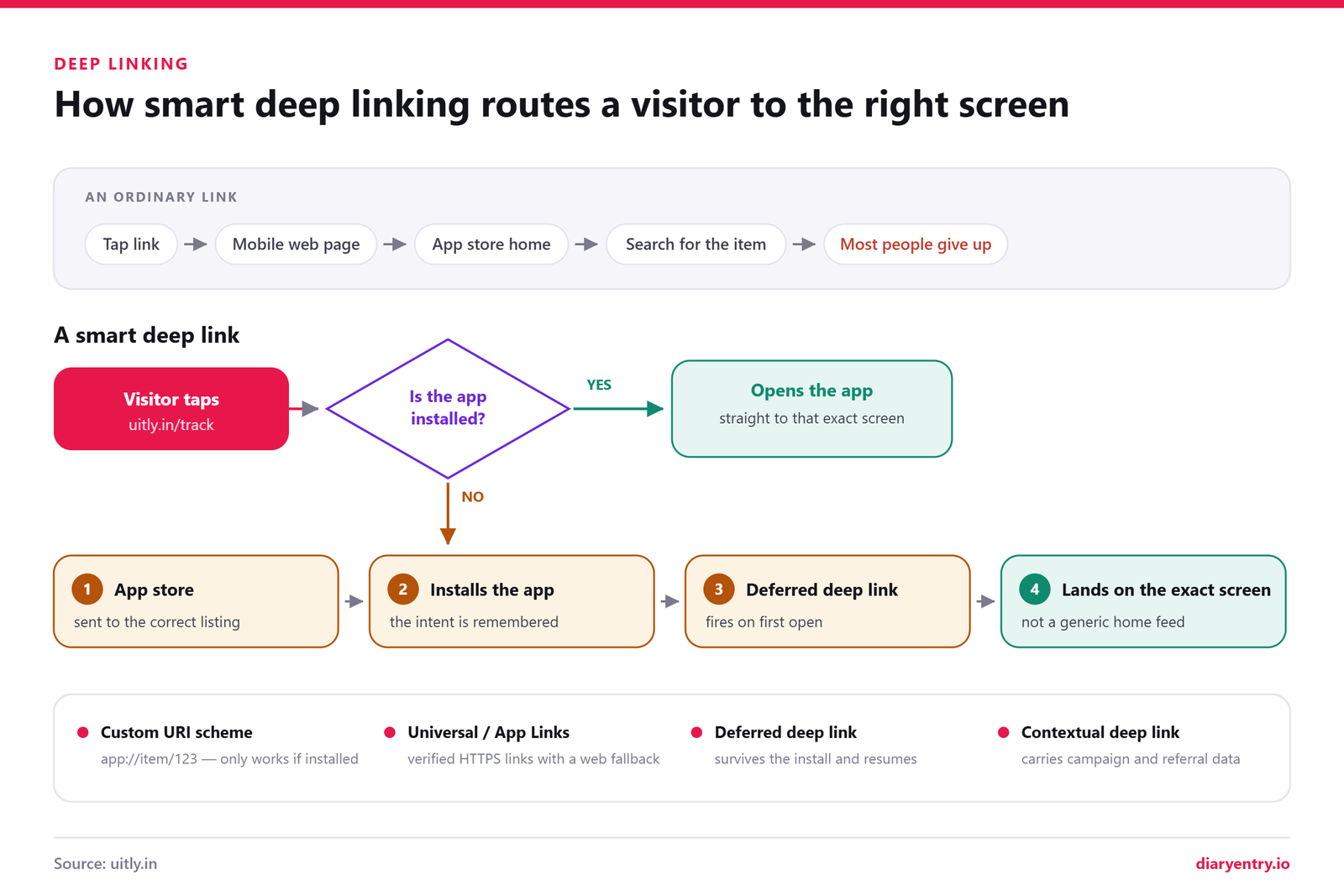
What is deep linking, and what are the four types?
“Deep link” gets used loosely, and that vagueness causes real problems. There are four distinct mechanisms, and they behave very differently when something goes wrong.
1. Standard deep links (custom URI schemes). These look like spotify://track/123 and are the oldest approach. If the app is installed, the operating system hands the link over and the user lands on the track. If it isn’t installed, nothing useful happens: a browser error, a blank tab, a shrug. They fail ungracefully, which is why almost nobody uses them alone in public campaigns any more.
2. Universal Links (iOS) and App Links (Android). These are ordinary HTTPS URLs. You prove you own the domain by hosting a verification file on it: apple-app-site-association for Apple, assetlinks.json under /.well-known/ for Android. When the app is installed, the OS opens it at the correct screen. When it isn’t, the very same URL just loads the web page. One link, graceful fallback, no dead ends.
3. Deferred deep linking. This kind survives an install. Someone without the app taps your link, gets routed to the App Store or Play Store, installs, opens the app for the first time, and arrives at the exact content you were promoting instead of a generic home screen. Matching that pre-install tap to the post-install session is the genuinely hard engineering, and it is what separates a real deep linking system from a redirect.
4. Contextual deep linking. Here the link carries data with it: campaign name, referrer, a referral code, a pending invite. The app reads that payload on first open and personalises what the user sees, applying the discount or crediting the right advocate automatically.
| Type | Works without the app installed | Survives an install | Setup effort | Typical use |
|---|---|---|---|---|
| Standard / URI scheme | No, usually errors out | No | Low | Internal navigation, legacy integrations |
| Universal Links / App Links | Yes, falls back to the web page | No | Medium, needs a domain verification file | Public marketing links, sharing, search results |
| Deferred deep linking | Yes, routes to the app store | Yes | High, needs an SDK or a platform | Install campaigns, paid acquisition, print and packaging |
| Contextual deep linking | Depends on the underlying method | Yes, when paired with deferred | High, requires in-app payload handling | Referral codes, invites, personalised onboarding |
Why does deep linking improve conversions?
Every extra tap between intent and content costs you people. A user who taps a promo, lands on a homepage, and then has to search for the thing they already wanted is a user you have asked to do the work twice. That drop-off is steep, and it is entirely self-inflicted.
App sessions also tend to convert better than mobile web for commerce and media. Payment details are saved, the session persists, push notifications are available, and the interface was built for the device rather than squeezed onto it. Sending an engaged tap to a browser when the app is already installed throws that advantage away.
Then there is attribution. Because contextual links carry campaign parameters all the way through, you can see which creative, channel or partner produced an install and a purchase, not merely a click. Any serious link management platform treats that reporting as part of the feature, alongside the click data you get from ordinary short links.
Where do marketers use smart deep linking?
- Paid social to a product screen. The ad shows a specific item, so the tap should land on that item in the app, not the storefront.
- Email to an in-app offer. Lifecycle emails open the relevant screen with the promotion already applied.
- A dynamic QR code on packaging. Scanning the box starts a warranty registration or reorder flow rather than dumping the customer on a corporate homepage.
- Influencer and referral codes. The code travels through the install so credit is assigned correctly without anyone typing anything.
- Re-engagement pushes and win-back campaigns. Dormant users return straight to abandoned baskets or new content.
- Music and podcast promotion. Exactly the Spotify scenario Uitly describes, where a track or episode opens in the listener’s own app.
If you are weighing up Uitly.in on this feature specifically, treat the homepage copy as a statement of intent rather than a spec sheet. Ask which of the four types are supported, whether deferred matching is included, and how the behaviour is reported alongside your QR codes and link in bio page. Those answers matter more than any URL shortener’s marketing paragraph.
Who Should Use Uitly.in? Six Real-World Scenarios
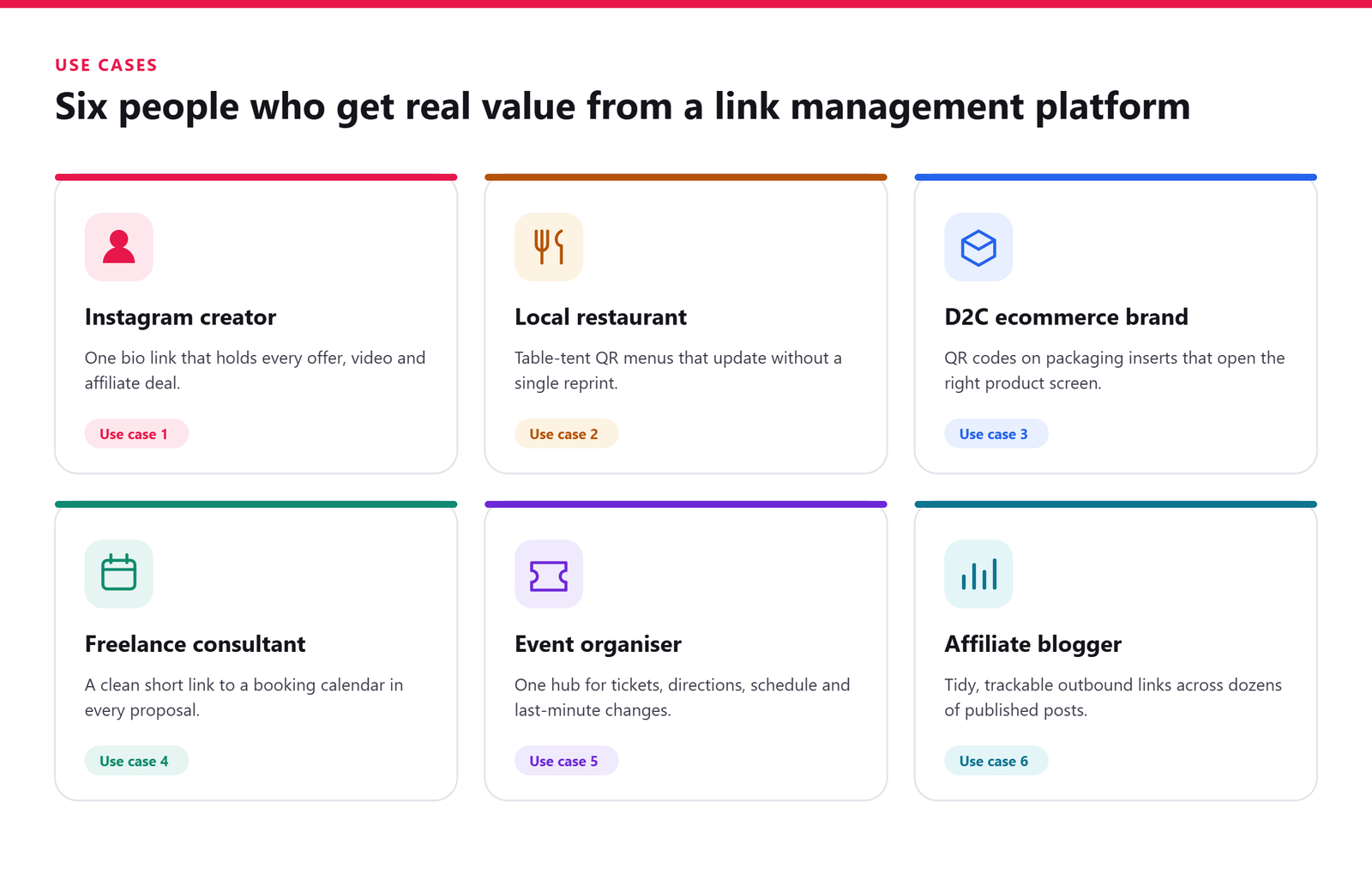
Uitly.in makes a broad promise: short links, dynamic QR codes and bio pages in one place. Promises like that are hard to judge in the abstract. So here are six people, six problems, and the Uitly tool that maps to each.
1. The Instagram creator monetising a small audience
You have a few thousand engaged followers, one clickable slot in your bio, and four things to promote this month. A link in bio page fixes that bottleneck: one permanent URL you never change, with the contents swapped whenever you like. The Uitly Bio Profiles page says its bio profiles support rich media such as video and music, and include built-in analytics tracking visits and click performance.
- One bio page holding the merch drop, newsletter, latest video and affiliate picks
- A separate short link per offer, so you can tell which one actually earns
- Smart deep linking so a Spotify track opens in the app, not a browser tab
2. The local restaurant running QR menus and table-tent offers
Printing is the enemy of a changing menu. If your code points at a PDF, every price change means a reprint. Point it at a short link instead: as a general rule, a dynamic QR code keeps the printed square fixed while the destination behind it stays editable.
- One QR per table tent for the menu, plus a second for the weekday offer
- Distinct short links for lunch and dinner, so you can compare scan patterns
- A bio page as the hub for menu, directions, timings and reservations
Good looks like changing tomorrow’s specials without reprinting a single card.
3. The D2C brand printing QR codes on packaging inserts
The insert in the box is your one guaranteed touchpoint after delivery, and most brands waste it on a web address nobody types. Uitly’s homepage claims QR codes are generated from your links in a single click, and names product packaging among the intended surfaces — a claim you can only confirm by asking.
- A QR on the insert going to a reorder or review page, never the homepage
- Branded short links printed alongside it, so the URL looks deliberate
- Deep linking so app users land on the product screen, not a store listing
4. The freelance consultant or coach taking bookings
Your booking link is long, ugly and stuffed with query parameters. It survives an email badly and a printed card worse. Uitly’s bio profiles page lists freelancers and coaches taking bookings as a core use case, which is the honest fit here.
- A bio page with the booking link pinned top, rates and proof below
- One clean short link for your email signature, proposals and LinkedIn
- A QR on your business card opening that same booking page
5. The event organiser handling registration, tickets and venue info
Events throw off a mess of URLs: registration, schedule, map, sponsor deck, feedback form. Attendees remember none of them, so give them one thing to remember.
- A single short link on every poster, flyer and social post for registration
- A QR on badges and venue signage pointing at the live schedule
- A bio page acting as the event hub, updated as sessions move
- Deep links so ticket URLs open in the ticketing app directly
Good looks like one link on the poster and zero “where’s the schedule?” messages.
6. The affiliate marketer or blogger managing many outbound links
You are running dozens of partner links across posts, emails and videos, every one long and forgettable, and a broken one costs you a commission you never find out about. At that volume the value is mostly administrative: consistent naming, one place to look, and destinations you can re-point when a partner changes their URL.
- Consistent short links per campaign, readable in a video description or podcast note
- Deep links dropping mobile readers into the product page inside the app
- QR codes for slides, print and anything that happens offline
Good looks like one readable link per campaign, and a disclosure that stays visible wherever that link is shared — shortening a link never removes the obligation to label it.
One caveat across all six: none of these setups starts with a signup screen. Whichever scenario fits you, step one is a written brief and a conversation, so build that lead time into the campaign plan rather than assuming you can provision links the night before.
How to Get Started With Uitly.in
This is where Uitly parts company with the tools you can be using inside a browser tab. There is no self-serve signup on Uitly.in. No free-account form, no public dashboard, no login link tucked into the header. Every GET STARTED button on the homepage points to exactly one destination: the Uitly contact page.
That is not a flaw, it is a business model. Enquiry-led onboarding is completely normal for managed and agency-style services, where scope gets agreed in a conversation rather than picked off a pricing table. It does change your expectations, though. You are opening a discussion, not starting an instant trial.
What actually happens when you click GET STARTED?
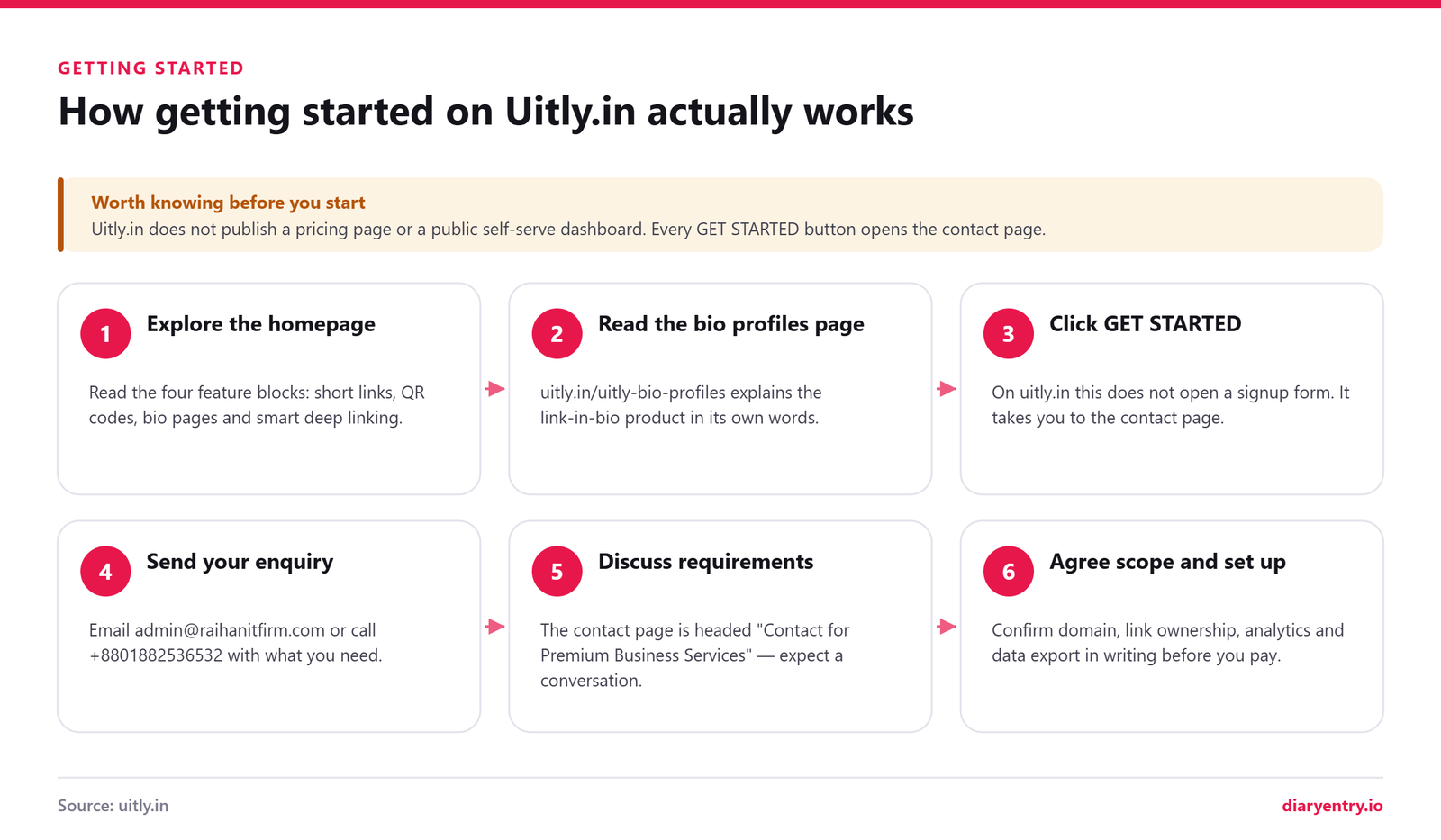
- Browse the homepage feature sections. Four blocks lay out the pitch: short links, QR codes, beautiful bio pages, and smart deep linking. Read them closely, because they are the clearest statement of what the product is meant to do.
- Read the Uitly Bio Profiles page. It is the most detailed product page on the site, and it walks through the link in bio page workflow: create a profile, add content blocks, customise the look, publish, then drop that single URL into your social bios.
- Click GET STARTED. The button opens the Uitly contact page rather than a signup screen. Expect this on every call to action across the site.
- Send an enquiry. Use the on-page form, email admin@raihanitfirm.com, or call +8801882536532. No physical address is published, so those two channels are your route in.
- Discuss requirements. The page’s own heading reads “Contact for Premium Business Services”, which tells you the conversation is scoped around business needs rather than a fixed self-serve plan.
- Agree scope and get set up. Since Uitly publishes no prices or tiers, cost, limits and timelines are things you establish directly with whoever replies.
Do a little homework before you write. Rough monthly link volume, whether you need a branded domain, which platforms your dynamic QR code campaigns will run on, and who else needs access. A specific enquiry gets a specific answer.
What to ask before you commit to any link management platform
This part is general guidance, not a description of Uitly’s published terms. Ask these of any URL shortener vendor, and get the answers in writing.
- Who owns the short domain? If it is theirs, your links live on their asset.
- What happens to live short links if you stop paying? Silent 404s can break printed material.
- Is there a link expiry policy for inactive or older links?
- Can you export your data in full, including click history?
- How granular is the analytics? Referrer, device, geography, time of day.
- Where is data stored, and is it GDPR-compliant?
- Is custom domain support included, and who manages the SSL?
- What uptime do they commit to, and is there a status page?
- Which redirect type is used? 301 versus 302 has real SEO consequences.
- Is bulk creation or API access available for scale?
- Can a printed QR code be re-targeted later without reprinting?
Exploring the Uitly.in blog
The domain has a second life as a publishing blog, split across two categories. It is a genuinely useful thing to know, because the editorial content sits alongside the product pages and covers subjects well outside link management.
| Category | Broad subject areas | Real titles published on the domain |
|---|---|---|
| Tech | Streaming, hardware and interface topics | “How to Fix Buffering and Streaming Issues With Your IPTV Service Quickly”; “Real-Time UI: The Design Challenges That Distinguish Live Data Interfaces From Static Digital Products” |
| Blog | Gaming, industry and general lifestyle pieces | “The Legacy of Donkey Kong Jr. and the Birth of a Hero”; “Top 10 Solar Inverter in India: Best Models for Home & Business” |
Read it for what it is: a multi-niche content site sharing a roof with a product landing page. Handy context if you are still deciding whether to send that first email.
Uitly.in vs Other Link Management Tools
Before you compare anything, work out which job you are actually hiring the tool to do. Most people start out looking for a URL shortener and end up buying three things at once: short links, QR codes and a link in bio page. Those are related products, but very few platforms are equally strong at all three.
A sensible shortlist comes down to five questions. Do you need branded short links running on your own domain? Will you print codes that must keep working after the destination changes, which means a dynamic QR code rather than a static one? Do you need a hosted bio page, or just a redirect? Who owns the account and the link data if the person who set it up leaves? And can you start today, or do you need to speak to someone first?
That last question sounds minor. In practice it is the clearest dividing line between Uitly.in and the household names below.
How does Uitly.in compare with Bitly, Rebrandly, Linktree and the rest?
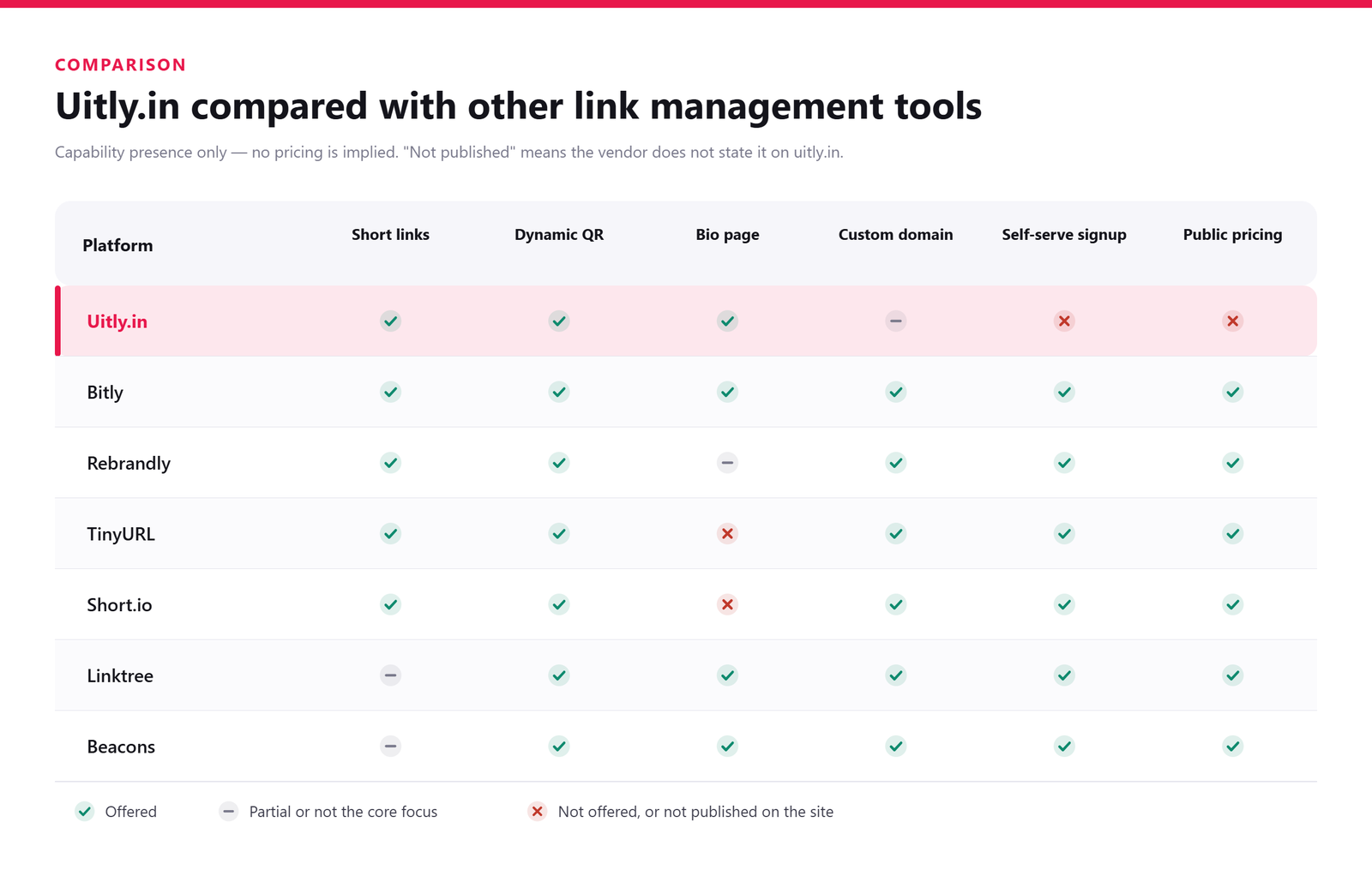
The table below is deliberately qualitative. The Uitly.in row uses only what the site itself states, and anything the site does not publish is marked Not published rather than guessed. The other rows reflect widely known, general product positioning, so always check the vendor’s own site before committing, because tiers and feature gates change often.
| Platform | Short links | Dynamic QR | Bio page | Custom domain | Self-serve signup | Public pricing page |
|---|---|---|---|---|---|---|
| Uitly.in | Yes | Yes | Yes | Not published | No, enquiry-led | Not published |
| Bitly | Yes | Yes | Yes | Yes | Yes | Yes |
| Rebrandly | Yes | Yes | Limited | Yes | Yes | Yes |
| TinyURL | Yes | Limited | No | Yes | Yes | Yes |
| Short.io | Yes | Yes | Limited | Yes | Yes | Yes |
| Linktree | Limited | Yes | Yes | Limited | Yes | Yes |
| Beacons | Limited | Yes | Yes | Limited | Yes | Yes |
What Uitly.in does well
Judged on what it actually says about itself, there is a coherent product idea here, and a couple of choices that are smarter than they first appear.
- Three tools under one roof. Shortening, QR generation and bio pages are presented as one link management platform rather than three separate subscriptions to reconcile.
- Smart deep linking is led with, not buried. The site uses a Spotify example: a promoted song opens inside the app instead of dumping people on a homepage. Deep linking is a more advanced capability than plain shortening, so leading with it rather than burying it is a confident move.
- Offline and online in the same story. QR codes for business cards, flyers, posters and packaging sit alongside links built for email and social, which is how most real campaigns actually run.
- Plain, unfussy positioning. Each tool is explained in language a non-marketer can follow.
- A proper bio pages explainer. The Uitly Bio Profiles page defines what a link-in-bio page is, lists the benefits it claims, and walks through the workflow step by step.
- Direct human contact. An email address and phone number, published openly, with no ticket portal in between.
Where the bigger platforms pull ahead
Being honest about the gaps matters more than being kind. These are the areas where established competitors are simply further along.
- Published pricing. Uitly does not publish a pricing page, so you cannot budget or compare before making contact.
- Instant trials. The alternatives listed above let you create a working link or page within minutes of signing up.
- Documented APIs and integrations. No API documentation or integrations list is published, which rules out automated link creation until you ask.
- SLAs, security and compliance pages. Procurement teams will ask for these, and larger vendors have them ready.
- Template libraries. Linktree and Beacons offer extensive theme and block galleries for bio pages.
- Verifiable track record. Public review profiles, case studies and named customers are absent, so you are relying on the conversation rather than the crowd.
How to decide between an enquiry-led service and self-serve software
There is no universally correct answer here. There is only the answer that fits how you like to buy.
- Choose enquiry-led when you want it set up for you. If you would rather describe the campaign and have someone configure the short links, codes and bio page, start with the Uitly contact page and treat it as a managed service conversation.
- Choose self-serve when you want to test in five minutes. If you need to validate an idea this afternoon, or you are comparing three tools side by side, a platform with an open signup will always win on speed.
- Ask both the same questions. Custom domain support, dynamic QR editing after printing, data export, analytics retention and account ownership. Get the answers in writing either way.
If you are leaning towards the enquiry-led route, read the About Us page first so you know what the company says it stands for, then bring a written brief to the first conversation. It saves a round of emails and tells you quickly how the service actually operates.
Is Uitly.in Legit? An Honest Trust Check
“Legit” is a blunt word for a nuanced question. The more useful version: what can you verify yourself before handing over your links, and what are you being asked to take on trust? Here is the answer, based only on what the site publishes.
Green flags: what checks out
These signals separate a maintained business site from an abandoned side project, and most of them are present.
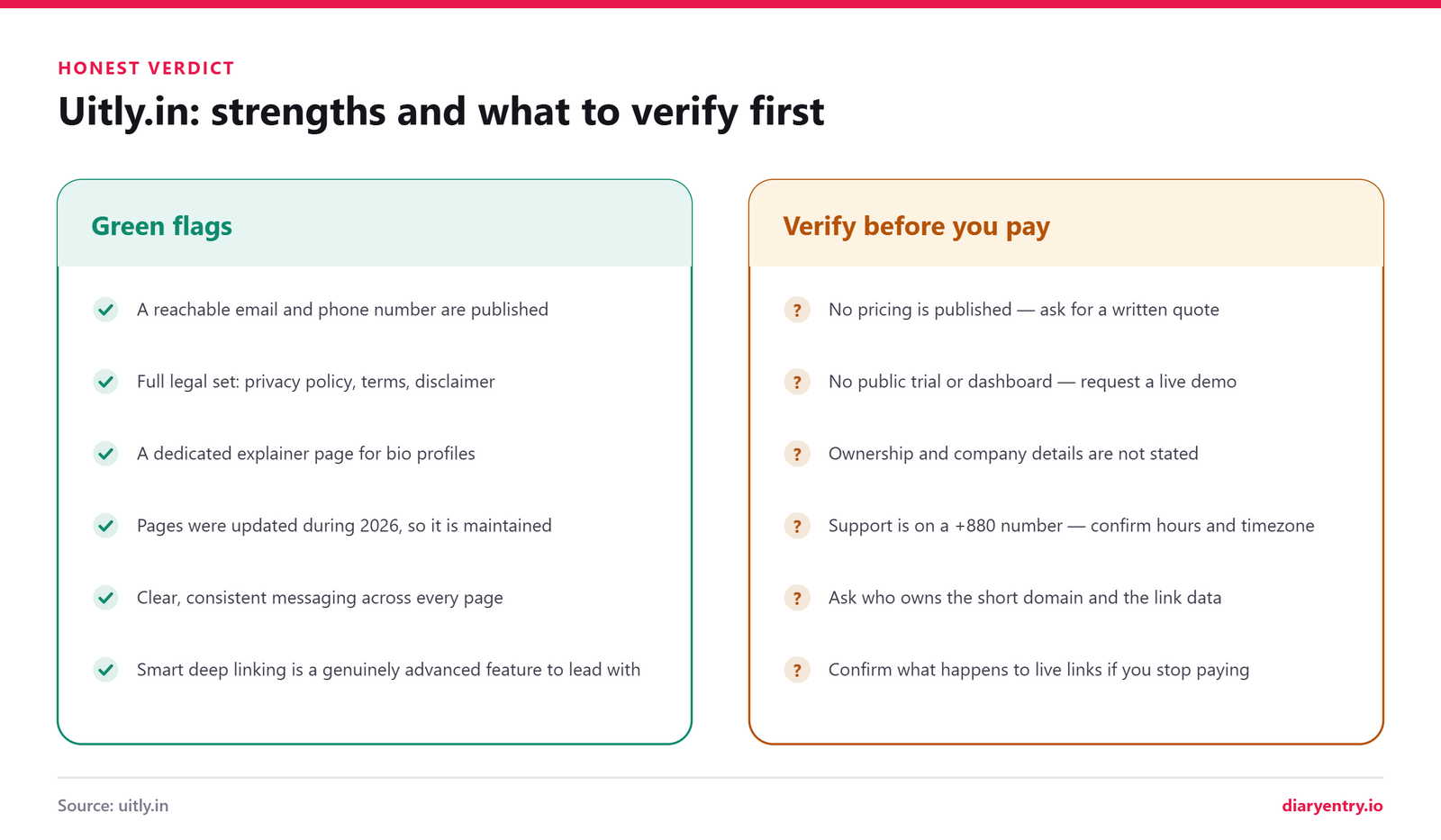
- Reachable contact details. A working email address (admin@raihanitfirm.com) and a phone number (+8801882536532) sit openly on the contact page, not hidden behind a form.
- A complete legal page set. There is a Privacy Policy, a Terms and Conditions page and a Disclaimer. Plenty of small tools publish one of the three and hope nobody notices.
- HTTPS throughout. Basic hygiene, but non-negotiable for a URL shortener, since every short link routes visitors through the provider before reaching your destination.
- An About page with a stated mission. The About Us page describes a customer-first mindset and a mission to “improve lives, empower communities, and lead with integrity”. It also states the positioning plainly: not just another URL shortener, but a broader link management platform.
- A dedicated product explainer. The Uitly Bio Profiles page sets out what a link in bio page is, how you build one and who it suits.
- Evidence of active upkeep. The sitemap carries 2026 last-modified dates: the contact page on 25 June 2026, the Privacy Policy and Disclaimer both on 8 April 2026.
- Consistent messaging. Short links, dynamic QR code generation, bio pages and smart deep linking are described the same way on the homepage and the deeper pages.
What to verify before you spend money
None of the following is an accusation. It is the ordinary due diligence you owe yourself with any small vendor, and much of it simply follows from Uitly.in being enquiry-led rather than self-serve.
- Get a written quote. No pricing is published on the site, so ask for the figure, the billing period and how renewals work, in writing, before you commit.
- Ask for a live demo. There is no public trial or self-serve signup, so a guided walkthrough is your only way to see whether there is a dashboard and what the analytics actually look like.
- Establish who you are contracting with. Ownership and company registration are not stated on the site, so request the legal entity name and invoicing country.
- Confirm support hours. The published number is a +880 Bangladesh line. Agree response times and check the overlap with your own working day.
- Clarify link ownership and data export. Ask whether you own your short links and click data, and whether you can export both in a usable format.
- Ask about continuity. If the service ever stops, what happens to links already printed on packaging? Can you point a custom domain at the platform so redirects stay yours?
The bottom line
On the trust question specifically, nothing here raises a flag. The site is tidy, legally complete and genuinely maintained, with reachable contact details and a full set of legal pages. What it withholds — pricing, ownership, a product you can actually see — it withholds openly rather than obscures, and it also doubles as a general tech and lifestyle blog, which is worth knowing before you judge the domain by its homepage alone.
It suits you if you would rather deal with a person than a pricing table. Creators, freelancers and small businesses wanting short links, scannable codes for printed material and one bio page tying them together are the likeliest fit, particularly for offline-heavy campaigns where QR codes carry the load. Everything past that is unverified until you ask.
Nothing about Uitly.in suggests it is other than it claims. It simply publishes less than a larger vendor would, and the only way to close that gap is to ask.
Frequently Asked Questions About Uitly.in
These are the questions people actually type into a search box before trying a new link management platform. Every answer below sticks to what the site itself publishes, plus clearly labelled general guidance where it stays quiet. Broadly, they fall into three groups:
- The product: what the tools are and how short links, QR codes and bio pages work.
- The practicalities: access, cost, analytics and how to reach a human.
- The unknowns: ownership, apps, APIs and the things the site simply does not state.
| Common question | Short answer |
|---|---|
| Is pricing published? | No. Nothing on the site lists prices or tiers. |
| Is there self-serve signup? | Not exposed. Every call to action leads to the contact form. |
| Is a founder or team named? | No. Ownership is not publicly stated. |
| Is there an app or public API? | No documentation for either is published. |
| Are custom branded domains offered? | The homepage says “branded” short links, but custom-domain setup is not documented. Worth asking directly. |
What is Uitly.in?
Uitly.in is a WordPress-built site presenting a link management platform with three core tools — short links, QR codes and bio pages — plus smart deep linking, which it frames as a standout capability rather than a separate product. Its homepage headline reads “Create Short URLs, QR Code & Beautiful Bio Page”. The same domain also runs a multi-niche blog under its Tech and Blog categories, so it genuinely wears two hats.
Is Uitly.in free to use, and what does it cost?
There is no pricing page, no published rates and no free-versus-paid tier list anywhere on the site. The contact page carries a heading about premium business services, which implies paid work, but no figures are given. If cost matters to you, ask for a written quote through the contact page before committing.
Do I need an account to create short links?
On uitly.in there is no public signup, login or dashboard exposed. The “GET STARTED” button on the homepage points to the contact form rather than a registration screen, so access appears to be enquiry-led rather than self-serve. Expect a conversation with a person before you get anything provisioned.
What is a dynamic QR code?
Generally speaking, a dynamic QR code does not encode your destination directly. It encodes a short redirect URL that you control, so the printed pattern stays fixed while the destination behind it can change. That indirection is also what makes scan tracking possible. Uitly’s homepage describes creating dynamic QR codes among its tools.
Can I edit a QR code after it has already been printed?
Only if it was generated as a dynamic code; a static one cannot be re-targeted without reprinting. This is standard across the industry rather than a documented Uitly behaviour, so confirm editability, and any limits on it, before you send artwork to a printer.
What is smart deep linking and why does it matter?
Deep linking sends someone to a specific screen inside an app instead of a generic homepage or app store listing. The site’s own example is a Spotify track opening directly in the Spotify app. Fewer taps between intent and content usually means better engagement, which is why marketers care about it.
What is a bio profile page?
The Uitly Bio Profiles page defines them as link-in-bio pages: custom pages that group multiple links and content under one URL. You publish one permanent address, drop it into your social profiles, and update the contents whenever your offers change instead of editing every bio individually.
Does Uitly.in provide analytics?
The only analytics claim on the site sits on the bio profiles page, which mentions built-in analytics tracking visits and click performance. No metric list, retention period, export option or dashboard screenshot is published, so treat the depth as an open question.
Can I use my own custom domain for short links?
The homepage does use the word “branded” when describing short links, but nothing on the site explains whether you can connect a domain you own, or how it would be configured, so do not assume the capability is included. As general practice, a branded short domain lifts click-through and keeps your name in the link, so it is a sensible first question to raise when you enquire.
Is Uitly.in safe to use?
The site serves over HTTPS and publishes a privacy policy, terms and a disclaimer. The privacy policy reads very close to the standard WordPress template and names no jurisdiction, which is worth knowing if you handle regulated data. Since access is contact-gated, you can ask about data handling before sharing anything sensitive.
How do I contact Uitly.in?
Use the contact form, email admin@raihanitfirm.com, or phone +8801882536532. The +880 prefix is Bangladesh, so factor in the time difference if you are elsewhere. No physical office address is published, and no named individual is listed as your point of contact.
Does Uitly have a mobile app or an API?
Neither is documented. There are no API docs, no SDKs, no integrations list, no uptime commitment and no app store listing referenced anywhere on the site. If your workflow depends on generating short links programmatically or inside another tool, ask whether that is possible before you plan around it.
Do short links hurt your SEO?
Not inherently, but the redirect type decides it. A 301 passes link equity to the destination, so a shortened link behaves much like a direct one for ranking purposes; a 302, which is what most link platforms use by default to keep click tracking accurate, does not pass equity the same way. Ask your provider which it issues. The other risks are practical: link rot if the shortener disappears, and the loss of brand signals when your domain is hidden behind someone else’s.
What happens to my links if I stop using the service?
Short links resolve only while the redirect service keeps running, so ending a relationship can break every link you have distributed. Ask about notice periods, redirect exports and whether destinations can be forwarded. Keep your own spreadsheet mapping each slug to its target, and prefer static, self-hosted URLs for anything printed permanently.
Is Uitly.in the same as uitly.co?
They are separate domains with similar names and similar subject matter. Nothing on uitly.in states that the two are operated by the same people, so do not assume they are connected, share accounts or share support. Check which domain you are actually on before entering details or making a payment.
Who owns Uitly.in?
No founder, leadership team or registered company is named publicly. The footer credits Uitly, and the contact email uses an IT firm’s domain, which hints that an agency runs it, but that is inference rather than a published fact. If corporate transparency matters to your procurement process, ask for it in writing.
Final Thoughts: Should You Send That Enquiry?
Uitly.in sets out a clear proposition: short links, dynamic QR codes, a link in bio page and smart deep linking, gathered into one link management platform with a friendly, well-written homepage. The About page puts it neatly, positioning Uitly as more than another URL shortener. On the concept side, the thinking is sound and the use cases are real.
What the site does not do is show you the product. There is no pricing, no self-serve dashboard, no team page and no API documentation, and every button routes to a contact form. That makes this a good fit for someone comfortable starting with a conversation, likely a small business, creator or local brand that wants help getting set up rather than a tool to explore alone. Teams needing instant provisioning, published service levels or programmatic access will want answers first.
So treat your first contact as a discovery call, not a signup. Take the checklist earlier in this guide, visit uitly.in, and ask about pricing, custom domains, analytics depth and what happens to your redirects if you leave. Clear answers to those four make the decision straightforward in either direction.